Website Health
Uses native WordPress Site Health results for checks such as REST API access, HTTPS, loopback requests, scheduled events, PHP and database conditions.

IntelliLanz brings WordPress Site Health, updates, plugins, themes, server information and known component connections into one clear administrator dashboard.
Analysis stays inside WordPress. No external monitoring service or AI connection is required.
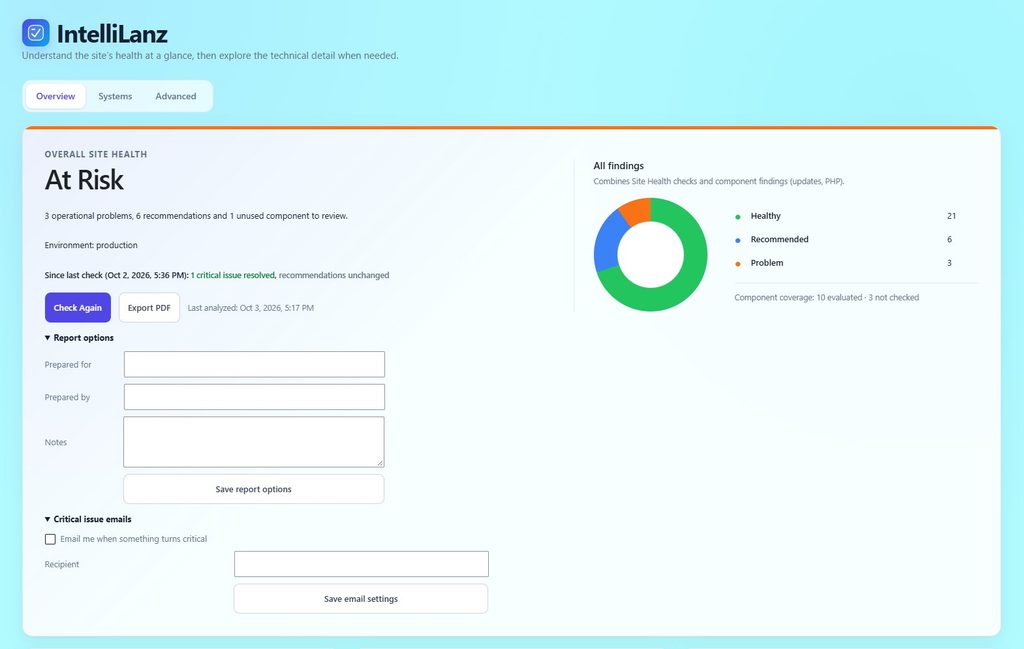
WordPress administrators often move between Site Health, Updates, Plugins, Themes and hosting panels before they can explain what needs attention.
IntelliLanz turns that scattered technical evidence into a focused workflow: analyze the site, understand the priorities, then inspect the supporting detail when you need it.
A pending plugin update is not the same as a failed health check. IntelliLanz keeps those signals distinct so the headline remains useful.
Uses native WordPress Site Health results for checks such as REST API access, HTTPS, loopback requests, scheduled events, PHP and database conditions.
Shows WordPress core, plugin and theme updates, inactive components and other work that should be reviewed without treating every item as a failure.
Groups components into meaningful systems and shows evidence-backed relationships, dependencies and integrations where WordPress exposes them safely.
Start the analysis when you choose. IntelliLanz runs WordPress health checks and inspects safe local component and environment data.
See a plain-language overview first, then open Systems or Advanced details for the evidence behind each result.
Review updates, snooze accepted recommendations, inspect connections and – on Pro – download a client-ready report or receive critical alerts.
IntelliLanz is designed for site owners, developers, consultants and agencies who need a reliable picture of a WordPress installation before deciding what to change.
Core version, environment, REST configuration and registered native Site Health tests, including supported third-party checks.
Active, inactive, must-use and network-active plugins; installed themes; versions, authors and available updates.
Safe PHP and database metadata, WordPress cron status, scheduled-event coverage and operational recommendations.
Conservative local observations such as file-editor configuration, XML-RPC state and whether a known backup plugin is active.
One-hop component connections, dependency evidence and guarded deletion for components that are re-verified as inactive.
Recent analysis summaries, coverage-aware comparisons and snooze controls for findings you have reviewed and accepted.
The Free edition has no time limit, scan quota, component limit or licence requirement. Pro adds the tools consultants and ongoing maintenance teams need to communicate and monitor results.
IntelliLanz does not hide the site behind a numerical score. Every headline state is based on real findings, and native Site Health evidence remains available for technical review.
A recommendation can be acknowledged for 30 days, 90 days or until its severity changes. Acknowledged items stay visible while leaving the main priority list, so accepted host-level limitations do not become permanent noise.
No. IntelliLanz uses native Site Health as a first-class source, preserves its evidence and adds clearer presentation, component discovery, maintenance information and relationship context.
The analysis itself is observational. Deleting an inactive plugin or theme is a separate, explicit action with capability checks, status re-verification, connection information and confirmation.
No external AI, telemetry or monitoring service is required. IntelliLanz works with local WordPress data and cached information already available to the site.
It means WordPress did not provide enough current evidence for a firm assessment. IntelliLanz explains the reason instead of presenting missing evidence as a healthy result.
Pro adds branded PDF reporting, report options, critical issue email notifications and CSV/JSON exports for client and technical workflows.
IntelliLanz supports WordPress 6.0 or later and PHP 7.4 or later. The dashboard is available to administrators with the required WordPress capability.
Use IntelliLanz to turn scattered WordPress diagnostics into priorities you can understand, act on and explain to a client.
Direct checkout for IntelliLanz Pro is being prepared. Contact me for current purchase details.